基础知识 为什么需要 Hive Hadoop 生态系统的出现,为以合理的成本处理大数据集提供了一个解决方案,它基于 HDFS(分布式文件系统)实现了一个 MapReduce 编程模型,将计算任务分散到多个硬件机器上,从而降低成本并提供水平伸缩性。
但是从现有的数据基础架构转移到 Hadoop 以及从 Hadoop 中获取数据是一个比较麻烦的事情(MapReduce Java API),Hive 的出现就是为了解决这个问题,基于 Hive 可以方便的实现结构化数据到 Hadoop 数据仓库的数据转移。
Hive 将大多数的查询转化成 MR 任务,HiveQL 既降低了使用难度,也提高了 Hadoop 的扩展性。
Hive 的局限
Hive 适用于数据不经常变动,而且不需要立即得到查询结果的情况。
由于 Hadoop 和 HDFS 的设计,Hive 不支持行级别的插入、删除及更新,不支持事务。
HiveQL 不符合 ANSI SQL 标准,很多 SQL 和 Oracle、MySQL 存在差异。
Java 和 Hive :词频统计算法 这是《Hadoop权威指南》中的第一章的例子程序,使用 Hadoop Java API 实现一个统计文本文件中每个单词出现次数的程序,可以帮助理解 MR 原理以及使用 Hive 的好处。
关键代码如下:
1 2 3 4 5 6 7 8 9 10 11 12 13 14 15 16 17 18 19 20 21 22 <dependencies > <dependency > <groupId > org.apache.hadoop</groupId > <artifactId > hadoop-common</artifactId > <version > 3.2.2</version > </dependency > <dependency > <groupId > org.apache.hadoop</groupId > <artifactId > hadoop-hdfs</artifactId > <version > 3.2.2</version > </dependency > <dependency > <groupId > org.apache.hadoop</groupId > <artifactId > hadoop-mapreduce-client-core</artifactId > <version > 3.2.2</version > </dependency > <dependency > <groupId > org.apache.hadoop</groupId > <artifactId > hadoop-client</artifactId > <version > 3.2.2</version > </dependency > </dependencies >
1
2
3
4
5
6
7
8
9
10
11
12
13
14
15
16
17
18
19
20
21
22
23
24
25
26
27
28
29
30
31
32
33
34
35
36
37
38
39
40
41
42
43
44
45
46
47
48
49
50
51
52
53
54
55
56
57
58
59
60
61
62
63
64
65
66
67
68
69
70
71
72
73
74
75
76
77
78
79
80
81
82
83
84
package im.yuki.wordcount;import org.apache.hadoop.conf.Configuration;import org.apache.hadoop.fs.FileSystem;import org.apache.hadoop.fs.Path;import org.apache.hadoop.io.LongWritable;import org.apache.hadoop.io.Text;import org.apache.hadoop.mapreduce.Job;import org.apache.hadoop.mapreduce.Mapper;import org.apache.hadoop.mapreduce.Reducer;import org.apache.hadoop.mapreduce.lib.input.FileInputFormat;import org.apache.hadoop.mapreduce.lib.output.FileOutputFormat;import java.io.IOException;public class WordCount { private static final String OUTPUT_PATH = "hdfs://127.0.0.1:9000/hdp/0317/wordcountoutput/" ; public static class Map extends Mapper <LongWritable, Text, Text, LongWritable> { private static final LongWritable one = new LongWritable (1 ); @Override protected void map (LongWritable key, Text value, Context context) throws IOException, InterruptedException { String[] words = value.toString().split(" " ); Text word; for (String w : words) { word = new Text (w); context.write(word, one); } } } public static class Reduce extends Reducer <Text, LongWritable, Text, LongWritable> { @Override protected void reduce (Text key, Iterable<LongWritable> values, Context context) throws IOException, InterruptedException { int count = 0 ; for (LongWritable value : values) { count += value.get(); } context.write(key, new LongWritable (count)); } } public static void main (String[] args) throws IOException, ClassNotFoundException, InterruptedException { System.setProperty("HADOOP_USER_NAME" , "longkun" ); Configuration configuration = new Configuration (); configuration.set("fs.defaultFS" , "hdfs://127.0.0.1:9000" ); configuration.set("yarn.resourcemanager.hostname" , "hdp01" ); FileSystem fileSystem = FileSystem.get(configuration); Job job = Job.getInstance(configuration, "WordCount" ); job.setJarByClass(WordCount.class); job.setMapperClass(Map.class); job.setCombinerClass(Reduce.class); job.setReducerClass(Reduce.class); job.setMapOutputKeyClass(Text.class); job.setMapOutputValueClass(LongWritable.class); job.setOutputKeyClass(Text.class); job.setOutputKeyClass(LongWritable.class); job.setNumReduceTasks(2 ); Path outputPath = new Path (OUTPUT_PATH); FileInputFormat.setInputPaths(job, new Path ("hdfs://127.0.0.1:9000/hdp/0317/wordcountinput/" )); FileOutputFormat.setOutputPath(job, outputPath); if (fileSystem.exists(outputPath)) { fileSystem.delete(outputPath, true ); } System.exit(job.waitForCompletion(true ) ? 0 : 1 ); } }
⚠️ 运行时会提示 log4j 的配置有误,运行程序前需要将 $HADOOP_HOME/etc/hadoop/log4j.properties 文件复制到 src/main/resouces 目录下。
将需要统计的文本文件上传到 hdfs://127.0.0.1:9000/hdp/0317/wordcountinput 目录下。
在 Hive 中统计词频:
1、将文本文件上传到 hdfs 中
1 hdfs dfs -put ~/Desktop/wordcount.txt /hdp/0317/wordcountinput
2、将 hdfs 中的数据插入到 Hive 表中
1 > load data inpath '/hdp/0317/wordcountinput/wordcount.txt' docs
3、HiveQL 查询结果
1
2
3
4
5
6
7
select tmp.word, count (* ) as cntfrom ( select explode(split(line, ' ' )) as word from docs ) tmp group by tmp.wordorder by cnt;
Hive 命令 执行 hive --help 查看 Hive 命令列表:
选项
名称
描述
cli
命令行界面
进入命令行。
hwi
Hive Web 界面
可以执行查询语句和其他命令的简单 Web 界面。
metastore
启动一个扩展的元数据服务,可以供多客户端使用。
rcfilecat
一个可以打印出 RCFile 格式文件内容的工具
CLI 选项 使用命令 hive --help --service cli 查看 cli 选项。
参数
含义
-d | –define
变量替换
-e
执行命令行中的 SQL
-f
从文件中执行 SQL
-H
打印帮助信息
-h
连接主机名
-i
初始化 SQL 文件
-p
连接端口
-S | -silent
交互式命令行下安静模式
-v | –verbose
输出调试信息
Hive 的属性命名空间
命名空间
权限
描述
hivevar
可读可写
用户自定义变量
hiveconf
可读可写
Hive 相关的配置
system
可读可写
Java 定义的配置属性
env
只可读
Shell 环境定义的环境变量
几个例子🌰:
1
2
3
4
5
6
7
8
9
10
11
12
13
14
15
16
17
18
19
20
21
22
23
24
25
26
# hivevar --define & set $ hive --define foo=bar; > set foo;> foo=bar; > set hivevar:foo=bar2;> create table tbl_0318(int i, ${foo} string); > desc tbl_0318; OK i int bar2 string # hiveconf # 显示当前所在库名 > set hiveconf hive.cli.print.current.db=true ;# system > set system:user.namesystem:user.name=longkun # env > set env :HOMEenv:HOME=/Users/longkun
Hive 中使用一次命令 ✅ 如果希望一次执行多个查询,查询结束后立即退出 cli,可以使用 -e 选项:
1 $ hive --service cli -e "select * from db_0316.docs where 1 = 1" ;
✅ 还可以将输出重定向到一个文件中:
1 $ hive --service cli -e "select * from db_0316.docs where 1 = 1" > ~/Desktop/hive_tmp_result.txt
✅ 当记不清楚某个属性名时,可以使用 grep :
1
2
3
4
5
$ hive -S -e "set" | grep current.db hive.cli.print.current.db=false $ hive -S -e "set" | grep warehouse hive.metastore.warehouse.dir=/user/hive/warehouse
从文件中执行查询 可以使用 -f 选项从文件中执行一个或多个查询语句,文件尽量使用 .q 或者 .hql 后缀。
新建一个文本文件 query.hql:
1
2
3
select * from db_0316.docs where 1 = 1;
1
2
3
4
5
# 执行查询 $ hive -S -f query.hql # 在 cli 中可以使用 source 命令来执行文件中的查询语句 > source ~/Documents/Hive/query.hql
hiverc文件 -i 选项执行一个文件,每次 CLI 启动时会先执行这个文件。Hive 会在当前目录下寻找 .hiverc 文件并执行。编辑 $HIVE_HOME/.hiverc 文件,添加几个比较实用的变量(⚠️ 分号是必须的):
1
2
3
set hive.cli.print.current.db=true; set hive.cli.print.header=true; set hive.exec.mode.local.auto=true;
✅ 使用 tab 键可以补全关键字或者函数名。
执行 shell 命令 无需退出 cli 即可执行简单的 shell 命令,只需要在 shell 命令前加上 ! ,并且以 ; 结尾。
1
2
hive (default)> !pwd; /Users/longkun
在 Hive 内使用 dfs 命令 用户可以在 cli 中执行 Hadoop 的 dfs 命令,只需要将 hdfs 去掉。
1
2
3
4
5
hive (default)> dfs -ls /; Found 3 items drwxr-xr-x - longkun supergroup 0 2022-03-17 23:54 /hdp drwx-wx-wx - longkun supergroup 0 2022-03-18 00:52 /tmp drwxr-xr-x - longkun supergroup 0 2022-03-16 21:50 /user
据说这种方式比在 bash shell 中执行 hdfs dfs … 更高效,因为后者会每次启动一个 JVM 实例,而 Hive 会在同一个进程执行。
数据类型和文件格式 byte、Byte、bit、字节
Hive 中的数据类型
数据类型
长度
例子🌰
TINYINT
1byte 有符号整数
20
SMALLINT
2byte 有符号整数
20
INT
4byte 有符号整数
20
BIGINT
8byte 有符号整数
20
BOOLEAN
bool类型,true 或者 false
TRUE
FLOAT
单精度浮点型
3.1315
DOUBLE
双精度浮点型
3.1415
STRING
字符序列,可以使用单引号或者双引号
‘zhang san’ “wang er”
TIMESTAMP
整数、浮点或者字符串
Unix新纪元秒,Unix新纪元秒及纳秒,JDBC时间格式
BINARY
字节数组
和关系型数据库中 VARNIBARY类似?没看懂
单精度和双精度是什么意思?单和双是什么意思?
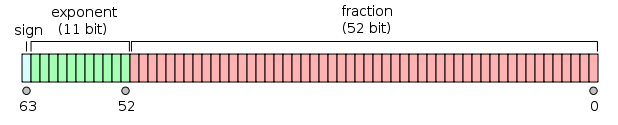
单精度:1位符号,8位指数,23位小数。
双精度:1位符号,11位指数,52位小数。
还是没解释 单 和 双 的意思。。
集合类型
Hive 中支持 struct、map 和 array 集合数据类型。
数据类型
描述
示例
STRUCT
与对象类似,可以通过 . 访问元素内容
struct{first string, last string}
MAP
键值对
map(‘first’, ‘john’, ‘last’, ‘doe’)
ARRAY
具有相同类型的变量集合
array(‘first’, ‘last’)
建表语句:
1
2
3
4
5
6
7
8
9
10
11
12
13
14
15
16
drop table if exists db_0320.tbl_person;drop table if exists db_0320.person;create table db_0320.tbl_person ( name string comment 'name' , age float comment 'age' , location string comment 'location' , friends array < string> comment 'friends' , score map< string, double > comment 'score' , address struct< number: tinyint, street: string, city: string> ) row format delimitedfields terminated by '\001' collection terminated by '\002' map keys terminated by '\003' lines terminated by '\n' stored as textfile;
HiveQL 数据定义 概览
HiveQL 和 MySQL 比较接近,但也有较大差异
Hive 不支持行级插入、更新及删除操作
Hive 不支持事务
大多数情况下 HiveQL 和其他 SQL 很像
查询、分组、过滤及连接
常见查询 1 2 3 4 5 6 7 8 9 10 11 12 13 14 15 16 17 18 19 20 21 22 23 24 25 > create database db_test;> create database if not exists db_test;> show databases;> show databases like 'db_*' > show tables from db_test;> drop database if exists db_test cascade;> desc formatted tbl_test;> describe db_0320.tbl_person.score;> create table if not exists tbl_test1 like tbl_test;
内部表与外部表(MANAGED_TABLE & EXTERNAL_TABLE) 使用 EXTERNAL 创建的表是外部表,否则就是内部表。内部表默认存储在 user/hive/warehouse/下, 当删除一个表时,Hive 会删除该目录下存储的数据;而删除外部表时,只会删除表的元数据,不会删除表数据。严格说,Hive 管理着这么目录和文件,但是不对其拥有完全控制权。
外部表示例:
1、先建立一个目录,存放外部表要操作的数据
2、建表并指向外部表空间
1 2 3 4 5 6 7 8 9 10 11 drop table if exists db_0320.ex_tbl_student; create external table if not exists db_0320.ex_tbl_student ( name string comment 'name', age float comment 'age', class string comment 'class' ) row format delimited fields terminated by ',' location '/hdp/0322/';
3、准备数据并上传至 HDFS
1 > dfs -put ~/Documents/ex_tbl_student.txt /hdp/0323/
文件内容:
1 2 3 zhangsan,12,一班 lisi,14,二班 wangwu,16,三班
4、将数据导入外部表中
1 > load data inpath '/hdp/0323/ex_tbl_student.txt' overwrite into table db_0320.ex_tbl_student;
5、确认数据及操作
分区表和管理表 分区将数据分散在多个目录下,可以提高查询性能。
如果表中数据或者分区中的数据量巨大,执行一个包含所有分区的查询会出发巨大的 MR 任务,可以将 hive.mapred.mode=strict 设置成严格模式禁止提交任务。
创建分区表:
1 2 3 4 5 6 7 8 drop table if exists db_0322.tbl_student;create table if not exists db_0322.tbl_student ( name string comment 'name' , age float comment 'age' , class string comment 'class' ) partitioned by (grade string comment 'grade' );
查看分区:
1 > desc partitions db_0322.tbl_student;
导入数据至分区表:
1 > load data inpath 'tbl_student.txt' overwrite into table tbl_student partition (grade='grade2' );
为外部分区表增加一个分区:
1 > alter table log add partition (year = 2012 , month = 1 , day = 1 );
对表的操作 删除表:
1 > drop table if exists db_0323.tbl_test;
可以了解下 Hive 的回收站功能。
修改表:可以使用 alter table 语句修改表,这种方式会修改表的元数据,不会修改数据本身。
1 2 3 4 5 6 7 8 9 10 11 12 13 14 15 16 17 18 19 20 21 22 23 24 25 26 27 > alter table tbl_test rename to tbl_test1;> alter table tbl_test add if not exists partition (city= 'Beijing' );> alter table tbl_test2 drop if exists partition (city = 'Beijing' );> alter table tbl_test2 change column name username string comment 'username' after column1;> alter table tbl_test1 add columns (age float comment 'age' );> alter table tbl_test1 set tblproperties ('note' = 'test note....' )> alter table tbl_test touch partition (year = 2021 , month = 12 , day = 1 );> alter table ... archive partition (year , month , day );> alter table tbl_test partition (year = 2021 , month = 10 , day = 1 ) enable no_drop;
HiveQL 数据操作 Hive 不支持行级数据插入、更新及删除,只能通过大批量的方式将数据导入表中。
1 > load data local inpath '${env:HOME}/data' overwrite into table tbl_test partition (year = 2022 , month = 3 , day = 22 );
local 表示本地目录,如果不加 local 则表示 hdfs 上的文件。
Hive 不会校验导入的数据和表的模式是否匹配,但是会校验文件格式是否和表的定义一致。
通过查询向表中导入数据:
1 2 3 4 5 6 7 8 9 10 11 12 use db_0323; from tbl_test3_tmp tmpinsert overwrite table tbl_test3 partition (city = 'Beijing' ) select name where tmp.city = 'Beijing' insert overwrite table tbl_test3 partition (city = 'Tianjin' ) select name where tmp.city = 'Tianjin' insert overwrite table tbl_test3 partition (city = 'Tianjing' ) select name where tmp.city = 'Tianjing' ;
如果一个分区一个分区的查出来再导入的话,会非常繁琐,可以使用动态分区插入来避免这个问题。
1 2 3 4 5 use db_0323; insert overwrite table tbl_test3select name, cityfrom tbl_test3_tmp;
最后的几列顺序要和分区字段一致,Hive 根据列位置来确定分区字段,而不是名称。并且静态分区字段必须位于动态分区字段之前。
dfs -ls /user/hive/warehouse/db_0323.db/tbl_test3 查看分区:
1 2 3 4 Found 3 items drwxr-xr-x - longkun supergroup 0 2022-03-24 23:56 /user/hive/warehouse/db_0323.db/tbl_test3/city=Beijing drwxr-xr-x - longkun supergroup 0 2022-03-24 23:56 /user/hive/warehouse/db_0323.db/tbl_test3/city=Tianjin drwxr-xr-x - longkun supergroup 0 2022-03-24 23:56 /user/hive/warehouse/db_0323.db/tbl_test3/city=Tianjing
动态分区功能默认是关闭的。开启后,默认以“严格”模式执行,这种模式下,要求至少有一列字段是静态分区,有助于防止因设计错误导致产生大量的分区。
动态分区相关属性:
属性名称
缺省值
描述
hive.exec.dynamic.partition
false
设置成 true,开启动态分区功能
hive.exec.dynamic.partition.mode
strict
设置成 no strict,允许所有列都是动态分区
hive.exec.max.dynamic.partitions.pernode
100
每个 mapper 和 reducer 可以创建的最大分数,超过会报错
hive.exec.max.dynamic.partitions
1000
一个动态分区语句可以创建的最大动态分区个数,超过会报错
hive.exec.max.created.files
100000
全局可以创建的最大文件个数,超过会报错
单个查询语句创建表并加载数据:
1 2 3 4 create table tbl_test4 as select namefrom tbl_test3where city = 'Beijing' ;
导出数据 insert directory:
1 2 3 4 5 6 7 8 9 10 11 12 13 14 15 16 use db_0323; insert overwrite local directory '${env:HOME}/Documents/Hive/export' select name, cityfrom tbl_test3where city = 'Beijing' ;from tbl_test3 tmpinsert overwrite local directory '${env:HOME}/Documents/Hive/export-beijing' select name where tmp.city = 'Beijing' insert overwrite local directory '${env:HOME}/Documents/Hive/export-tianjin' select name where tmp.city = 'Tianjin' insert overwrite local directory '${env:HOME}/Documents/Hive/export-tianjing' select name where tmp.city = 'Tianjing' ;
Hive 中没有临时表的概念。
HiveQL 查询 常用函数:
返回值类型
函数
描述
BIGINT
round(double d)
取近似值
DOUBLE
round(double d, int n)
取近似值,保留 n 位小数
BIGINT
floot(double d)
向下取整
BIGINT
ceil(double d)
向上取整
DOUBLE
rand()
生成一个 DOUBLE 类型的随机数
STRING
concat_ws(string separator, string s1, string s2…)
使用指定的分隔符连接字符串
STRING
substr(string s, int start, int length)
截取子字符串
STRING
to_date(string date)
‘2022-01-01 10:20:12’ -> ‘2022-01-01’
INT
year(string date)
返回年
INT
month
获取月份
INT
date_diff(string date1, string date2)
获取两个日期相差天数
INT
date_add(string date, int days)
日期相加
INT
date_sub(string date, int days)
日期相减
嵌套 SELECT 1 2 3 4 5 6 7 from ( select name, age from tbl_test3 where age > 10 ) tmp select tmp.* where tmp.name like 'zhang%' ;
CASE WHEN 1 2 3 4 5 6 7 8 select name, case when age < 18 then '未成年' when age >= 18 and age < 60 then '成年' else '老年' end as age, sex from tbl_test;
避免进行 MapReduce
where 条件中过滤字段是分区字段
没有 where 条件的 select 语句
hive.exec.mode.local.auto=true 会尝试本地模式执行其他 SQL
类型转换 cast 最好使用 ceil / floor / round 等函数来将字符串转为整数。
抽样查询 按照(基于行数的)百分比进行抽样。
1 select * from tbl_student_info_tmp tablesample (50 percent );
UNION ALL 将多个子表进行合并,这几个子表的列及顺序及类型必须完全一致,理论上可以改为多个 where 语句。
HiveQL 视图 可以使用视图简化查询:
1 2 3 4 5 6 7 8 9 10 11 create view view_student_beijing as select uid, name, age, grade, classfrom tbl_student_infowhere home_address.province = '北京' ;select * from view_student_beijingwhere ceil (age) <= 20 ;
删除视图:
1 drop view if exists view_student_beijing;
视图不能做为 load 和 insert 的目标表。视图是只读的,只允许改变与数据信息 tblpropreties。
1 alter view set tblproperties('created_by' = 'system' );
HiveQL 索引 模式设计 分区表 随着系统运行时间的增加,表数据量会越来越大,Hive 查询通常是全表扫描,性能会越来越低。可以使用分区表提高性能。
1 2 create table tbl_test(name string)partitioned by (kind string);
分区列只是一个目录名称,实际不存储这一列数据。
应该选择合适的分区字段,如果分区数太大,会创建大量的 Hadoop 文件及文件夹,反而会降低查询效率。
可以选择多个分区字段来进行分区。
1 2 3 4 create table student ( name string, sex string ) partitioned by (grade string, class string);
查看分区:
1 show partitions table_name;
唯一键和标准化 Hive 没有关系型数据库中的唯一键和序列自增,应避免对非标准化(?)数据进行 JOIN 操作,复杂的数据类型,可以通过 Array、Map、STRUCT 实现。
同一份数据处理多次 Hive 可以从一个数据源产生多个数据聚合,而无需每次聚合都重新扫描一次,可以节省很多时间。
1 2 3 from tbl_student_info_tmpinsert overwrite tbl_student_info1 where age > 10 ;insert overwrite tbl_student_info2 where age > 20 ;
对于每个表的分区 对于一些中间数据可以使用分区,可以保证任务重跑的时候不会覆盖所有的数据,只对目标数据进行处理。
这几个月负责公司一些数据的处理,基本都是按月拉结果,使用月末的时间做为分区,这样每一个月的数据都可以留存下来成为历史数据,不受下个月数据的影响。
分桶 🪣 Hive表分区的实质是分目录(将超大表的数据按指定标准细分到指定目录),且分区的字段不属于Hive表中存在的字段;分桶的实质是分文件(将超大文件的数据按指定标准细分到分桶文件),且分桶的字段必须在Hive表中存在。
分桶的好处在于表中的数据已经按条件分到了多个文件中,join 或者其他计算时只需取符合条件的数据进行处理,从而提高性能。
1 2 3 4 5 6 7 8 9 10 11 12 13 14 15 16 17 18 19 20 21 22 23 24 25 26 27 28 29 30 31 32 33 34 35 36 37 38 39 40 use db_0327; drop table if exists bucket_tbl_student_info;create table if not exists bucket_tbl_student_info ( uid string comment 'uid' , name string comment 'name' , age int comment 'age' ) clustered by (age) into 2 buckets row format delimitedfields terminated by ',' lines terminated by '\n' ; set hiveconf:hive.enforce.bucketing= true ;use db_0327; from tbl_student_info_tmpinsert overwrite table bucket_tbl_student_infoselect uid, name, floor (age) as age where 1 = 1 ;set hiveconf:mapred.reduce.tasks= 2 ;use db_0327; from tbl_student_info_tmpinsert into table bucket_tbl_student_infoselect uid, name, floor (age)where 1 = 1 cluster by age; select uid, name, age from bucket_tbl_student_info tablesample (bucket 1 out of 2 on age);
将 hive.enforce.bucketing 设置成 true 之后,Hive 会在目标表初始化过程中设置一个正确的 reducer 数。
为表新增列
Hive 表对数据格式的要求比较宽松,列的信息在元数据中,新增列或者删除列只是改变元数据。如果列的个数比实际数据的列要多,则多余的列会被省略,相反,则会以 NULL 填充。
Hive 表新增列:
1 alter table tbl_access_log add columns (rank1 int , rank2 int );
在新增列之前入库的数据,查询的时候新加的字段会用 NULL 填充。
使用列存储表 📦 Hive 默认使用行式存储。假设有足够多的列,列中有很多的重复数据,这种类型的数据使用列式存储性能会更好,查询的时候不要加载所有列的数据。
参见 15.3.2 RCfile 使用这种格式?
使用压缩 🗜️ 几乎所有的情况下,使用压缩都能降低磁盘占用量,降低 I/O 以提高查询速度。
使用外部数据或者非压缩格式时无法使用压缩。
压缩和解压缩都会消耗 CPU 资源,但是大多数 MR 任务都是 I/O 密集型任务,所以 CPU 开销通常不是问题。
Hive 常见问题及解决方案记录 📝 1、启动 Hive 报错:Cannot create directory /tmp/hive/longkun/50be98c2-62e0-4b37-9002-c2270fed6a20. Name node is in safe mode.
控制台日志提示无法创建临时目录,Hive 处于安全模式中。
安全模式主要是 HDFS 系统的时候检查 DataNode 上数据块的有效性,同时根据策略复制和删除部分数据块,运行的时候也可以通过命令进入安全模式。安全模式中不允许修改和删除数据。
可以通过命令来离开安全🔐模式:hadoop dfsadmin -safemode leave
离开安全模式之后,Hive 正常启动。