订阅RSS并自动更新到博客内展示

开往 进入到一个站。

第一印象是这个域名很别致,4个首字母简写,简直是过目不忘的优质域名。

这个站点有个朋友圈的功能,就是定时更新别人发布的博客文章到自己的站点内,当然仅限于 title 和摘要内容。我也萌生了这样的想法,虽说很多人在交换友链,但是经常互相看看的应该少之又少。

说干就干,于是开始了新功能的开发计划。

方案设计

首先要设计好数据链路:

  1. RSS 订阅(本想更新加了友链的这几个,但是很多都没有 RSS 订阅功能,只能订阅一些其他的订阅源)
  2. 写一个定时任务,定时获取 RSS 的 xml 文件
  3. 解析 RSS 的 xml 文件并加工成一个包含发布时间在前 n 的文章的 json 文件(moments.json)
  4. 在主题内增加一个 page,用来解析 moments.json 文件并展示(包含作者、作者主页、发布时间、标题、摘要)

定时任务根据配置好的 atom.xml 文件地址获取文件暂存到本地,然后进行解析,解析的数据覆盖跟新到 source/_data/moments.json 文件中,然后 push 到博客源文件仓库,并重新执行发布操作,这样就完成了一次状态更新。

可行性

仔细了解了 RSS ,文件格式统一,这样一来,解析就不是问题。

刚刚学会使用 GitHub Actions 进行博客静态文件部署,只知道可以配置定时任务,不确定是否可以在 task 中执行 python 脚本,包括文件操作、os 命令等。

后来网上找了一下,GitHub Actions 都支持,这产品体验确实没得说。

剩下的都不是问题了。

原型

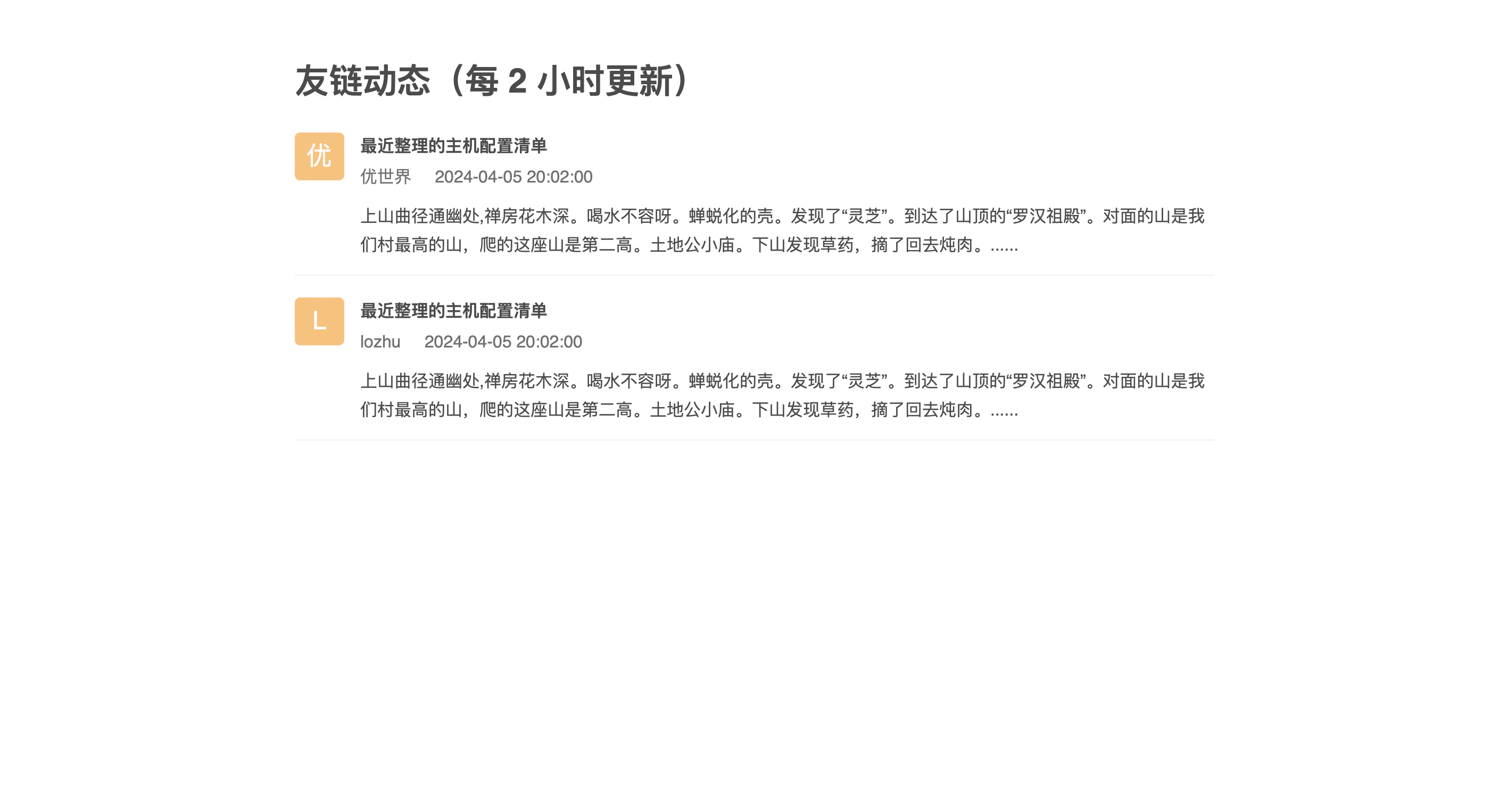
先用静态的 moments.json 文件实现静态页面。

1
2
3
4
5
6
7
8
9
10
11
12
13
14
15
16
17
18
[
{
"author": "优世界",
"homepage": "http://www.xiaoliu.life/",
"title": "最近整理的主机配置清单",
"momentUrl": "http://www.xiaoliu.life/p/20240415a/",
"publishTime": "2024-04-05 20:02:00",
"summary": "上山曲径通幽处,禅房花木深。喝水不容呀。蝉蜕化的壳。发现了“灵芝”。到达了山顶的“罗汉祖殿”。对面的山是我们村最高的山,爬的这座山是第二高。土地公小庙。下山发现草药,摘了回去炖肉。......"
},
{
"author": "lozhu",
"homepage": "http://www.xiaoliu.life/",
"title": "最近整理的主机配置清单",
"momentUrl": "http://www.xiaoliu.life/p/20240414b/",
"publishTime": "2024-04-05 20:02:00",
"summary": "上山曲径通幽处,禅房花木深。喝水不容呀。蝉蜕化的壳。发现了“灵芝”。到达了山顶的“罗汉祖殿”。对面的山是我们村最高的山,爬的这座山是第二高。土地公小庙。下山发现草药,摘了回去炖肉。......"
}
]

原型图

页面很简单。

一直没有实现随机颜色的头像背景色。头像配合伪元素实现的,不知道怎么用 js 动态的改变伪元素的背景色。下面这种方式无法实现,而且就算实现了,改了一个伪类,所有的头像都会变成一个颜色,还是无法实现功能。

1
2
3
4
5
6
7
8
9
10
11
12
13
14
15
16
17
18
(function() {
var avatarNodes = document.getElementsByClassName("avatar");
if (!avatarNodes || avatarNodes.length === 0) {
console.log("节点元素不存在");
}
for (var i = 0; i< avatarNodes.length; i++) {
var avatarNode = avatarNodes[i];
var val = avatarNode.getAttribute("value");
var str = '';
for (var j = 0; j < val.length; j++) {
str += parseInt(val[j].charCodeAt(0), 10).toString(16);
}
var bgColor = '#' + str.slice(1, 4);
avatarNode.setAttribute("data-content", bgColor);

console.log('val: ', avatarNode.getAttribute("data-content"));
}
})();

RSS XML 解析

python 脚本

因为 RSS xml 文件格式固定,使用 python xml.dom.minidom 库进行解析:

1
2
3
4
5
6
7
8
9
10
11
12
13
14
15
16
17
18
19
20
21
22
23
24
25
26
27
28
29
30
31
32
33
34
35
36
37
38
39
40
41
42
43
44
45
46
47
48
49
50
51
52
53
54
55
56
57
58
59
60
61
62
63
64
65
66
67
68
69
70
71
72
73
74
75
76
77
78
79
80
81
82
83
84
85
86
87
88
89
90
91
92
93
94
95
96
97
98
99
100
101
102
103
104
105
106
107
108
109
110
111
112
113
114
115
116
117
118
119
120
121
122
123
124
125
126
127
128
129
130
131
132
133
134
135
136
137
138
139
140
141
142
143
144
145
146
147
148
149
150
151
152
153
import xml.dom.minidom
import os
import time
import re


class Moment:
author = ""
homepage = ""
title = ""
postUrl = ""
publishTime = ""
postSummary = ""

def __init__(self, author, homepage, title, postUrl, publishTime, postSummary):
self.author = author
self.homepage = homepage
self.title = title
self.postUrl = postUrl
self.publishTime = publishTime
self.postSummary = postSummary


class Tool:
# 要订阅的网站
urls = []

# 处理指定日志之后更新的文章
moments = []

def __init__(self, urls, moments):
self.urls = urls
self.moments = moments

def parseInfo(self):

for url in self.urls:

# os.system("curl https://lozhu.happy365.day/atom.xml > tmp.xml")
os.system("curl " + url + " > tmp.xml")


# 打开xml文档
dom = xml.dom.minidom.parse("tmp.xml")

# 得到文档元素对象
root = dom.documentElement


# 获取作者名称
authorNodes = root.getElementsByTagName("author")
author = authorNodes[0].getElementsByTagName("name")[0].firstChild.data

# author
print("作者: ", author)


# 获取主页链接
linkNodes = root.getElementsByTagName("link")
homepage = linkNodes[1].getAttribute("href")

# homepage
print("主页: ", homepage)


postNodes = root.getElementsByTagName("entry")
if (postNodes is None):
print("一篇文章也没有")

for postNode in postNodes:

print("========")

# 文章标题
title = postNode.getElementsByTagName("title")[0].firstChild.data
print("文章标题: ", title)

# 文章链接
postLinkNode = postNode.getElementsByTagName("link")[0]
postUrl = postLinkNode.getAttribute("href")
print("文章链接: ", postUrl)

# 发布时间
publishTimeStr = postNode.getElementsByTagName("published")[0].firstChild.data
publishTime = publishTimeStr[0:10] + " " + publishTimeStr[11:19]
print("发布时间", publishTime)

# 文章摘要
postSummary = "暂无文章摘要"
if (len(postNode.getElementsByTagName("summary")) > 0):
postSummary = postNode.getElementsByTagName("summary")[0].firstChild.data
postSummary = re.sub(r'<.*?>', '', postSummary)
postSummary = re.sub(r'<\r\n>', '', postSummary)
postSummary = re.sub(r'[\n\"\\]*?', '', postSummary)
if len(postSummary) > 200:
postSummary = postSummary[0:150]
postSummary = postSummary + "..."
print("文章摘要: ", postSummary)

moment = Moment(author, homepage, title, postUrl, publishTime, postSummary)

self.moments.append(moment)

def writeContent(self, fullFilePath: str):

jsonStrs = []

sortedMoments = sorted(self.moments, key=lambda Moment: time.strptime(Moment.publishTime, "%Y-%m-%d %H:%M:%S"))

# 按发布时间倒序
sortedMoments.reverse()

# 如果有超过 50 篇的话,只展示前 50 篇
if (len(sortedMoments) > 100):
sortedMoments = sortedMoments[0:100]

for moment in sortedMoments:
json = (" {\n"
" \"author\": \"" + moment.author + "\",\n"
" \"homepage\": \"" + moment.homepage + "\",\n"
" \"title\": \"" + moment.title + "\",\n"
" \"momentUrl\": \"" + moment.postUrl + "\",\n"
" \"publishTime\": \"" + moment.publishTime +"\", \n"
" \"summary\": \"" + moment.postSummary + "\"\n"
" }")

jsonStrs.append(json)

momentContent = "[\n" + ',\n'.join(jsonStrs) + "\n]\n"

print("准备写入文件\n")

with open(fullFilePath, "w") as f:
f.write(momentContent)
f.close()

print("写入文件完成\n")


if __name__ == '__main__':
urls = ["https://www.xiaoliu.life/atom.xml", "https://blog.bxzdyg.cn/atom.xml",
"https://blog.liukuan.cc/atom.xml", "https://www.xwsclub.top/atom.xml",
"https://b.leonus.cn/atom.xml", "https://liheyuting.github.io/atom.xml",
"https://aciano.top/atom.xml", "https://z.arlmy.me/atom.xml",
"https://blog.starsharbor.com/atom.xml"]
moments = []
tool = Tool(urls, moments)
tool.parseInfo()
tool.writeContent("source/_data/moments.json")
print("主函数处理完成\n")

将脚本放在博客根目录下,定时执行:python parse_feed.py

问题1

这里发现一个问题,atom.xml 里的摘要 summary 字段存放的是 html 源码,有些还带有样式,展示到摘要里观感很不好。这里使用了简单的正则表达式去除了部分标签,但是会有残留,不太好处理。

问题2

只支持 atom.xml 这样的 RSS 源。

GitHub Actions 定时任务配置

脚本内容如下:

1
2
3
4
5
6
7
8
9
10
11
12
13
14
15
16
17
18
19
20
21
22
23
24
25
26
27
28
29
30
31
32
33
34
35
36
37
38
39
40
41
42
43
44
45
46
47
48
49
50
51
52
53
54
55
56
57
58
59
60
61
62
63
64
65
66
67
68
69
70
71
72
73
74
75
76
77
78
79
80
81
82
83
84
85
86
name: update blog

env:
TZ: Asia/Shanghai

on:
push:
branches:
- main
schedule:
- cron: '0 0/2 * * *'

jobs:
fetch:
name: fetch rss post
runs-on: ubuntu-latest

steps:
- name: checkout actions
uses: actions/checkout@v4

- name: Set up Python 3.9
uses: actions/setup-python@v2
with:
python-version: 3.9

- name: fetch post list
run: |
python feed_parse.py

- name: commit
env:
GITHUB_REPO: github.com/lozhu20/blogsource
run: |
git config --global user.name lozhu20
git config --global user.email lozhu@icloud.com
git pull --rebase
git add .
git commit -m "feed parse schedule task" && git push "https://${{ secrets.DEPLOY_KEY }}@$GITHUB_REPO" main:main || echo "Nothing to cmomit"

blog-cicd:
name: Hexo blog build & deploy
needs: fetch
runs-on: ubuntu-latest # 使用最新的 Ubuntu 系统作为编译部署的环境

steps:
- name: Checkout codes
uses: actions/checkout@v4

- name: Setup node
# 设置 node.js 环境
uses: actions/setup-node@v1
with:
node-version: '18.x'

- name: Cache node modules
# 设置包缓存目录,避免每次下载
uses: actions/cache@v1
with:
path: ~/.npm
key: ${{ runner.os }}-node-${{ hashFiles('**/package-lock.json') }}

- name: Install hexo dependencies
# 下载 hexo-cli 脚手架及相关安装包
run: |
npm install -g hexo-cli
npm install

- name: Generate files
# 编译 markdown 文件
run: |
hexo clean
hexo generate

- name: Deploy hexo blog
env:
# Github 仓库
GITHUB_REPO: github.com/lozhu20/lozhu20.github.io
# 将编译后的博客文件推送到指定仓库
run: |
cd ./public && git init && git add .
git config user.name "lozhu20"
git config user.email "lozhu@icloud.com"
git add .
git commit -m "GitHub Actions Auto Builder at $(date +'%Y-%m-%d %H:%M:%S')" && git push --force "https://${{ secrets.DEPLOY_KEY }}@$GITHUB_REPO" master:main || echo "Nothing to commit"

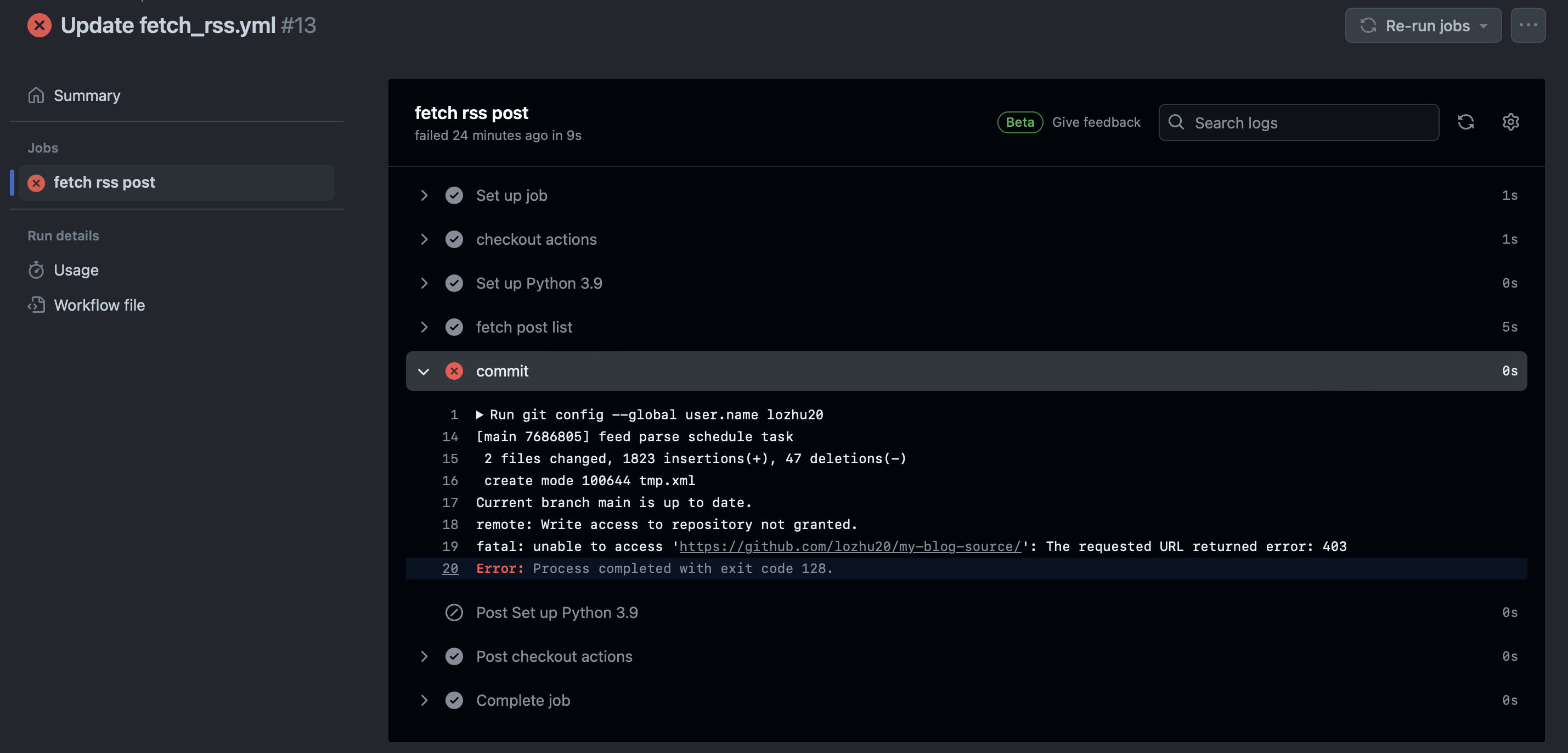
遇到一个报错卡了好久:

1
2
3
4
5
6
[main 7686805] feed parse schedule task
2 files changed, 1823 insertions(+), 47 deletions(-)
create mode 100644 tmp.xml
Current branch main is up to date.
remote: Write access to repository not granted.
fatal: unable to access 'https://github.com/lozhu20/my-blog-source/': The requested URL returned error: 403

报错

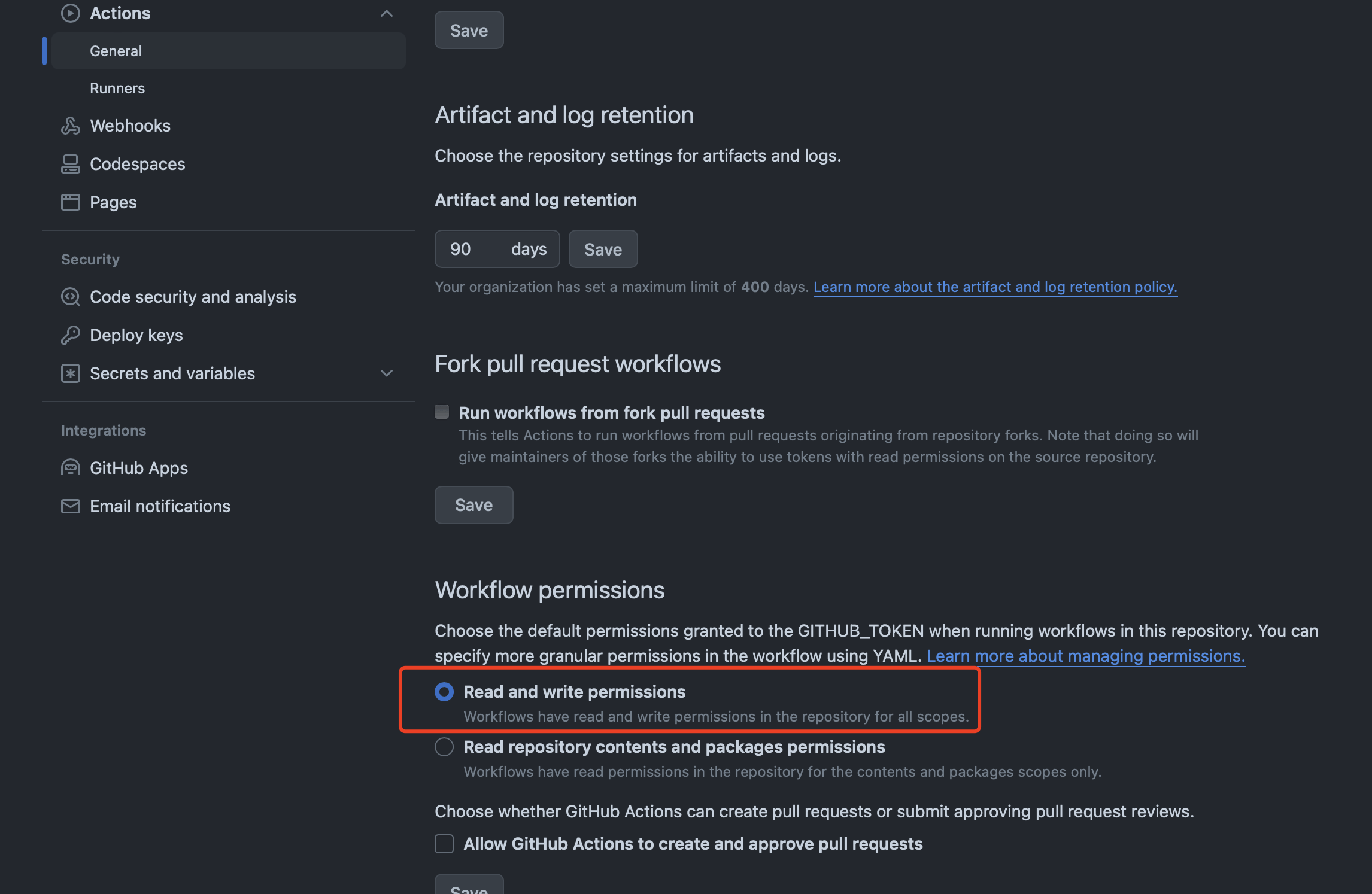
仓库默认只给 Actions 读取权限,需要手动设置写权限:解决:github actions remote: Write access to repository not granted

修改配置

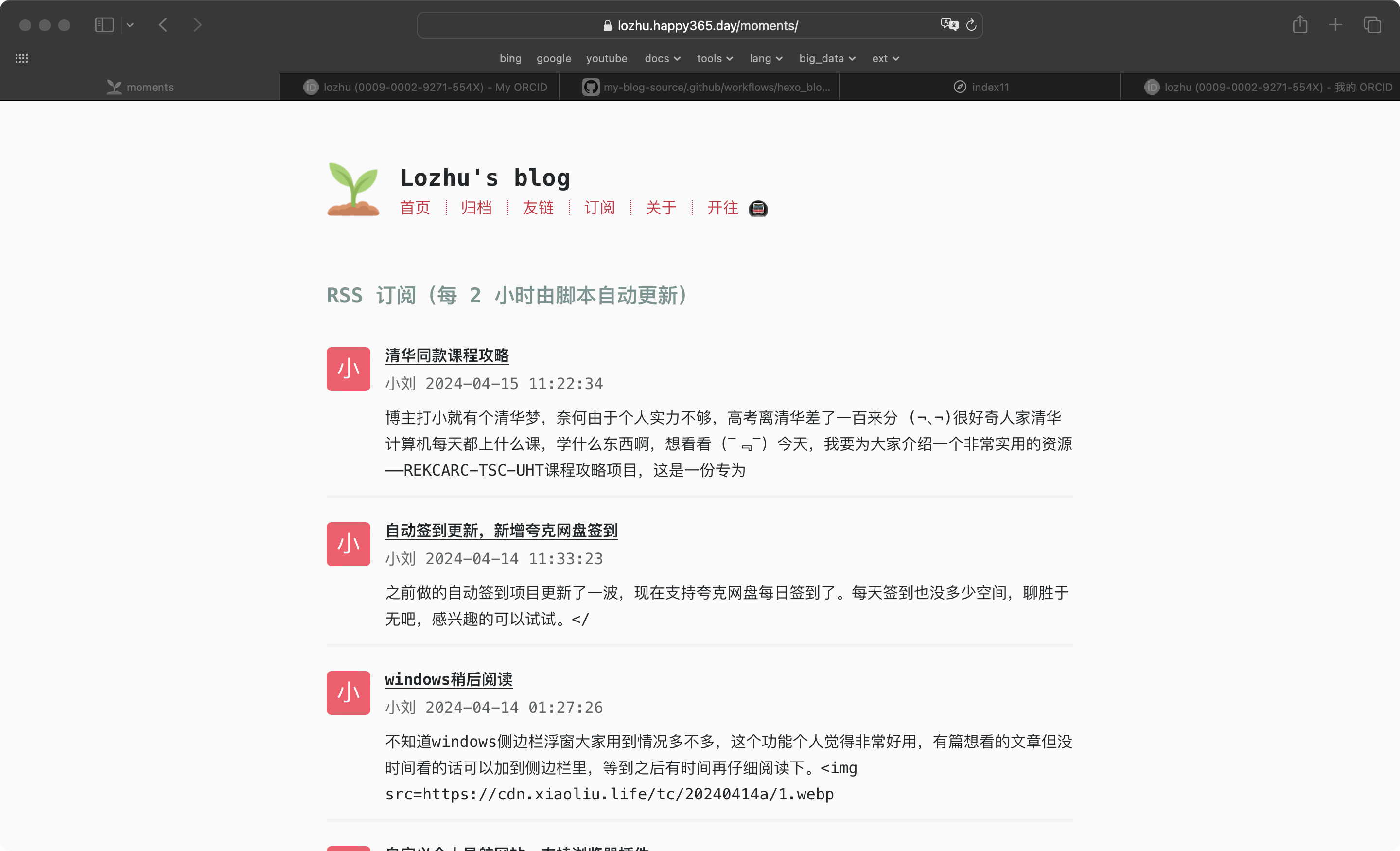
至此,整体功能已经实现。

初步效果

更好的 RSS 解析方案

feedparser

网上看到有专门解析 RSS 的第三方 python 库:feedparser

安装:

1
pip3 install feedparser

安装完成直接就能用了。

1
2
3
4
5
6
7
8
9
10
11
12
13
>>> import feedparser

# 美团技术团队
>>> d = feedparser.parse("https://tech.meituan.com")

>>> d.feed.author
'tech@meituan.com (美团技术团队)'
>>> d.feed.title
'美团技术团队'
>>> d.feed.subtitle
'美团技术团队最近更新内容。'
>>> d.feed.link
'https://tech.meituan.com/feed/'

这可比自己写的 python 脚本管用多了,还能处理各种格式的订阅源,真的很方便!

其他 RSS 订阅器实现

  • 参考 若志随笔 大佬的 freshrss 实现